Guide · November 2026
Most big plugin makers ship their own app to download, activate and update their products: Native Access for Native Instruments and iZotope, Waves Central, UA Connect, Arturia Software Center and more. Each one covers its own maker. Sonisto replaces none of them: it lists what every maker’s app installed, in one library, and tells you which plugins have updates.
Updated 10 November 2026 by Sonisto, which makes the plugin manager this guide mentions. Every fact about an app comes from its maker’s own page, linked in the table and read on 10 November 2026.
| Maker | App | What it does, in the maker’s words | Mac | Windows | Official page |
|---|---|---|---|---|---|
| Native Instruments | Native Access | Download, activate and update current NI products, and manage NI subscriptions. Works online, signed in to a Native account; legacy NI software is not supported. | Yes | Yes | native-instruments.com |
| iZotope | Native Access | Since 30 April 2025 the hub for products in an iZotope subscription, in place of iZotope’s Product Portal. You sign in with a Native ID. | Yes | Yes | support.izotope.com |
| Waves | Waves Central | Install, activate and update Waves products. Version 17.1.4 for macOS 10.15 to macOS 27 and 17.1.5 for Windows 10 and 11, both dated 3 November 2026. Waves asks you to switch off any VPN first. | Yes | Yes | waves.com |
| Universal Audio | UA Connect | Manages installing UAD plug-ins and firmware updates, and activates UAD effects and instruments when needed. It updates itself. | Yes | Yes | uaudio.com |
| Arturia | Arturia Software Center | Arturia calls it the hub to download, install and update all Arturia software. The files on the page were version 2.13.0. | Yes | Yes | arturia.com |
| Softube | Softube Central | The installer app on your Softube My Account page. It activates and deactivates licenses, as the iLok License Manager also can; iLok USB keys work only in the iLok License Manager for now. Version 3.1.0. | Yes | Yes | softube.com |
| Spitfire Audio | Spitfire Audio app | Install and update your Spitfire libraries, by direct download or from a hard drive, and see them all in one view. | Yes | Yes | spitfireaudio.com |
| Plugin Alliance | Installation Manager | Browse, download and install Plugin Alliance products and start 14-day trials, with a free Plugin Alliance account. Version 1.4.0 for macOS 13 to 26 and Windows 10 and 11. | Yes | Yes | plugin-alliance.com |
| IK Multimedia | IK Product Manager | Registration, downloads, installation, authorization and checking for updates, for current IK products. Legacy products stay with IK’s older Authorization Manager. | Yes | Yes | ikmultimedia.com |
| Slate Digital | Complete Access Hub (formerly Slate Digital Connect) | Install, activate and update Slate Digital, Eiosis and Complete Access plugins. Licenses go to iLok Cloud, the computer or an iLok USB key. | Yes | Yes | support.slatedigital.com |
| Steinberg | Steinberg Download Assistant | Updates and full installers for recent Steinberg programs and sound content, and redeeming Download Access Codes; a Steinberg login is needed. Older products are on Steinberg’s download pages. | Yes | Yes | steinberg.net/sda |
| iLok (PACE) | iLok License Manager | Licenses only: activate, deactivate and move licenses between a computer, an iLok USB key and the iLok Cloud. Its installer brings the drivers and system files iLok needs. macOS 10.14 or later, Windows 10 or later, 64-bit. | Yes | Yes | ilok.com |
| FabFilter | None | One installer per plugin, or one Total bundle installer. Every download is a 30-day trial, and a license key from FabFilter’s shop unlocks it. | Yes | Yes | fabfilter.com |
A maker not listed here usually sends a plain installer with the download link, and a serial number or license file with it. Our guide to installing and organizing new plugins covers that case.
Softube and Slate Digital use iLok: Softube lets you activate in Softube Central or in the iLok License Manager, and Slate’s Complete Access Hub offers iLok Cloud, the computer or an iLok USB key. The iLok License Manager installs no plugins. It only moves licenses, so you still need each maker’s installer. Our guide to plugin serial numbers and licenses explains the systems side by side.
Each app shows only its own maker’s products. None of them tells you what is installed across every maker, which formats went to which folder, or whether a plugin from another maker has an update. With eight makers you have eight apps to open, and still no single list.
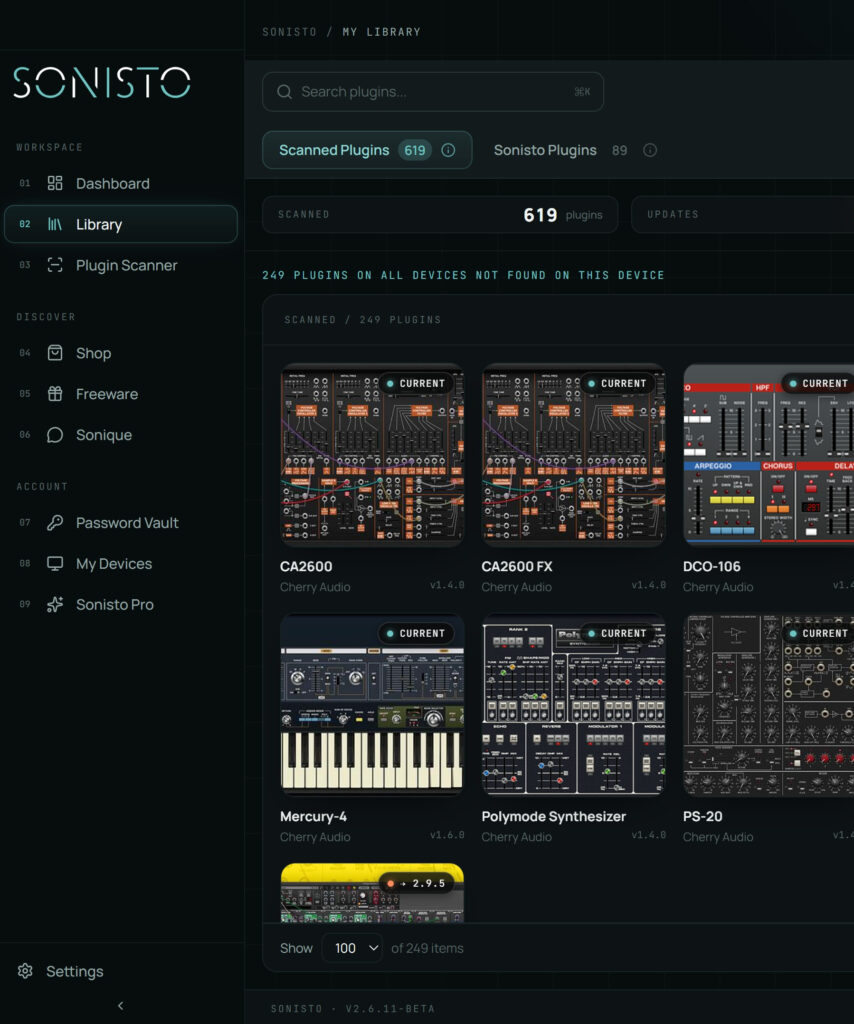
Sonisto replaces none of these apps: you still use each maker’s app to download, activate and update that maker’s products. What it adds is one list. Its scan lists every VST2, VST3, AU and AAX plugin on the computer, by brand and version, and shows where each format installed. It sends update notifications for 10 plugins on the free plan and for every plugin on Basic and Pro, with a link to the maker’s installer. It does not install updates for you, apart from freeware and a few selected brands. Exporting the list, a vault for serial keys and comparing two computers are on Basic and Pro. See the desktop app.
Install each maker’s app on the new computer first, sign in, and reinstall from there. Free up activations on the old computer before you wipe it: Softube licenses have three activations, and the iLok License Manager lets you move a license by dragging it to a new location. Our guide to moving plugins to a new computer goes through it step by step, and how to check plugin updates covers keeping versions current.
For products in an iZotope subscription, yes. iZotope says that since 30 April 2025 Native Access is the hub for them, so you no longer use Product Portal to download them or get their updates. You sign in with a Native ID. Its article covers subscriptions, not every older license.
Its download page names none. FabFilter offers one installer per plugin and a Total bundle installer, for Mac and Windows. Every download is a fully working 30-day trial, and a license key bought in FabFilter’s online shop unlocks it, so there is no separate app to sign in to there.
It moves licenses, not plugins. Its installer holds the drivers and system files iLok needs, and the app activates and deactivates licenses on a computer, an iLok USB key or the iLok Cloud. Activation needs the internet, and the iLok Cloud needs a constant connection while the licensed software runs.
We know of none that does it for every maker. Each app on this page installs one maker’s products. Some managers install updates for a set of vendors, PluginHub for nearly 60, and Sonisto installs freeware and a few selected brands. For everything else, use the maker’s own app.
Waves lists Waves Central 17.1.4, dated 3 November 2026, for macOS 10.15 Catalina up to macOS 27, and 17.1.5 for Windows 10 and 11. Older systems have a separate Waves page. The app supporting your system does not mean every older Waves plugin does, so check those too.
Also: all our guides, how to check plugin updates, moving plugins to a new computer, and where plugins are stored.
Scan your computer, see what you own and keep your setup under control with Sonisto.
Download the Sonisto Desktop App now and get ready to scan and organize.
Sonisto runs on Mac and Windows. Send yourself the link and download it on your computer.