Guide · October 2026
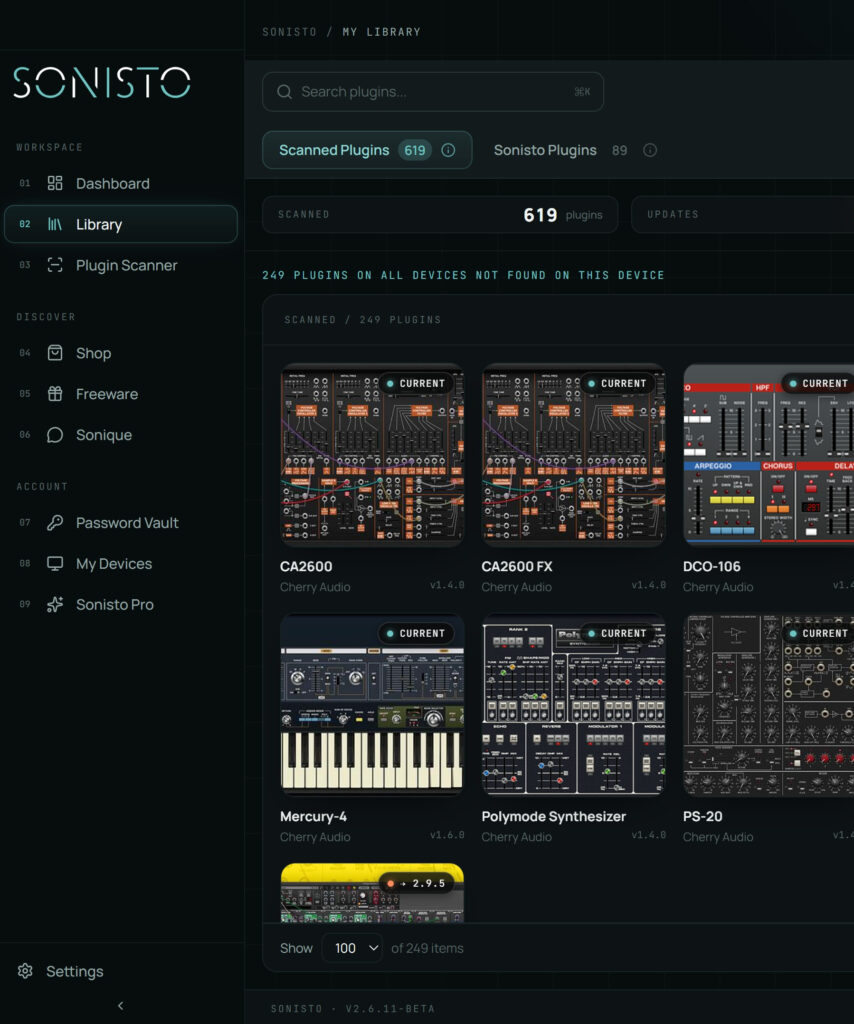
To check for plugin updates, compare the version you have installed with the latest version each developer publishes. The big brands have their own apps that do this for their own plugins (Native Access, Waves Central, Arturia Software Center, UA Connect). For everything else you check the developer’s site, or use a plugin manager that reads the versions on your computer and lists the plugins that have a newer one. Sonisto does this for every brand it can match, on Mac and Windows: free for 10 plugins, all of them on the paid plans.
Updated 22 October 2026 by Sonisto, which makes the plugin manager this guide mentions.
Most plugins show their version in their own About or info screen. Without opening a DAW: on a Mac, select the plugin file in /Library/Audio/Plug-Ins/ (the .vst3 or .component) and choose Get Info; on Windows, right-click the plugin’s .dll or .vst3 file, choose Properties and look under Details. Not every developer fills in that field.
Native Instruments uses Native Access, Waves uses Waves Central, Arturia uses Arturia Software Center, Universal Audio uses UA Connect, and Plugin Alliance has its Installation Manager. Each one shows updates for that brand only, so with ten brands you open ten apps.
Smaller developers usually post the latest version and a changelog on the product page or in a download area behind your account. Their newsletters announce updates too, if you are subscribed.
A plugin manager reads the installed version of every plugin it finds and compares it with the latest it knows of. Sonisto scans your computer, lists your plugins by brand with their versions, marks the ones that have an update and links to the developer’s latest installer. You still run the installer yourself.
A new version can change how a plugin sounds or loads old sessions. Check once a month, read the changelog, and update between projects. Keep the old installer until you know the new version works.
Native Instruments’ app for installing, updating and activating its products. iZotope subscriptions moved from iZotope Product Portal to Native Access in 2025, so if you have one, look for its updates in Native Access.
A Kontakt library with a serial number is added in Native Access with Add Serial, then installed there, or located if you downloaded it from the library’s maker.
Softube’s app installs and updates Softube plugins. Their licenses sit in the iLok account linked to your Softube account.
A store, not an app that updates plugins. What you bought there has its downloads in the Products section of your Plugin Boutique account, and newer versions appear under My Updates. The plugin is then installed and activated the way its maker does it.
Shows where each iLok license sits (a USB key, a computer or iLok Cloud) and lets you move it. It handles the license, not the plugin’s installer.
Sonisto does not replace these apps. It lists every plugin it finds on your computer, from every brand, marks the ones with an update, and links to the maker’s latest installer or download manager, so you know which of these apps to open. You still run the installer yourself.
Compare the installed version of each plugin with the latest version on the developer’s site, brand by brand, or scan your computer with a plugin manager that lists the plugins with a newer version. Sonisto’s free plan shows updates for 10 plugins; Basic and Pro show them for all.
No. Sonisto shows which plugins have an update and links to the developer’s latest installer; you download and run it. A scan only reads what is installed and does not change any installation files.
Each of those brands updates its own plugins through its own app. A plugin manager can show you, in one list, which plugins from every brand have an update, so you know which of those apps to open.
Organizing a large library? See where every plugin format installs and seven steps to keep it tidy, or compare the plugin managers. See what Sonisto does.
Scan your computer, see what you own and keep your setup under control with Sonisto.
Download the Sonisto Desktop App now and get ready to scan and organize.
Sonisto runs on Mac and Windows. Send yourself the link and download it on your computer.