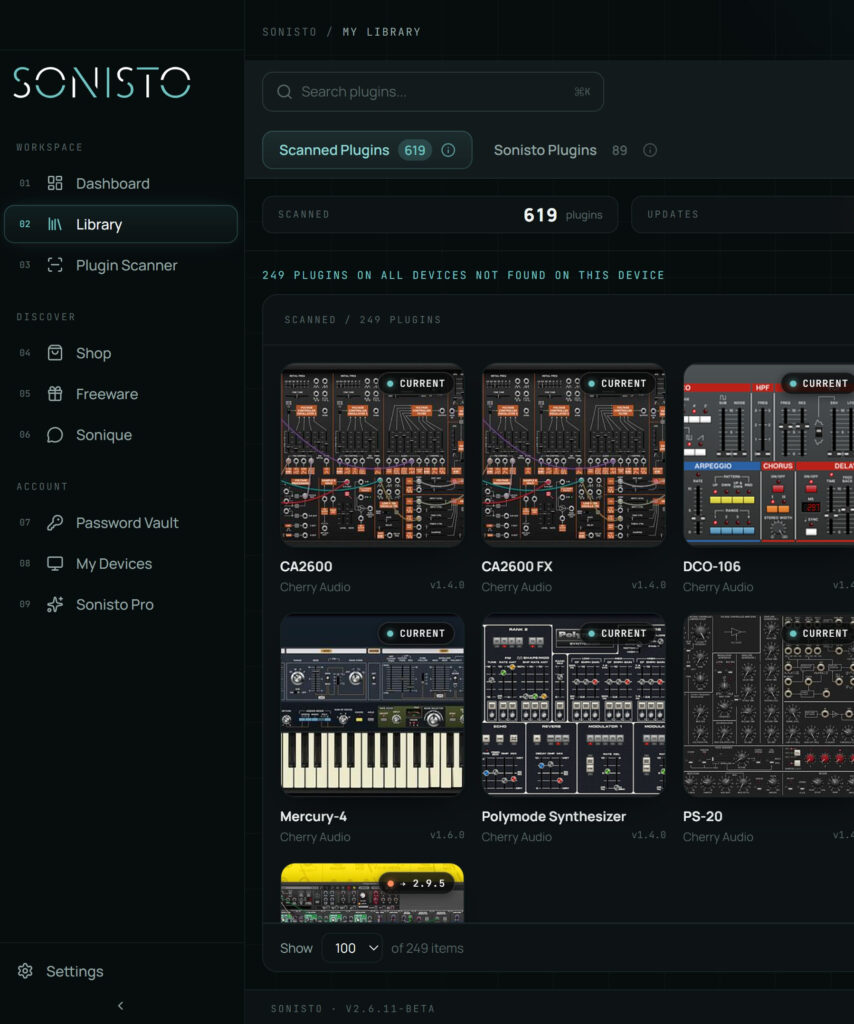
Scan your Mac or Windows computer and turn your installed plugins into one searchable library.
Sonisto scans your computer, identifies your installed plugins and automatically builds a visual library of your entire collection. Choosing a plugin manager? See how the main plugin managers compare, or follow our step-by-step guide to organizing VST plugins.
Know when new versions of your plugins are available without checking dozens of manufacturer websites.
Keep your plugin logins, passwords and serial keys connected to the products and brands they belong to.
Jump straight to the latest installer for your plugins.
Compare two devices and see what is on both and what is missing from each.
Instruments and effects, Roth-AIR and Caelum Audio Flux Mini among them. Install the ones you want from the app.
Buy plugins from Soundtoys, Arturia, FabFilter and other brands, in the same account.
Start with Sonisto Free and build your plugin library. Upgrade to Basic or Pro when you want more devices, more scans, update notifications for every plugin or the password vault.
1 device, 1 scan a month and free plugins.
2 devices, 20 scans a month, update notifications for every plugin and the Password Vault.
Up to 10 devices and unlimited scans. On yearly, 12 plugins the day you join, yours to keep.
Download the Sonisto Desktop App now and get ready to scan and organize.
Sonisto runs on Mac and Windows. Send yourself the link and download it on your computer.