Guide · October 2026
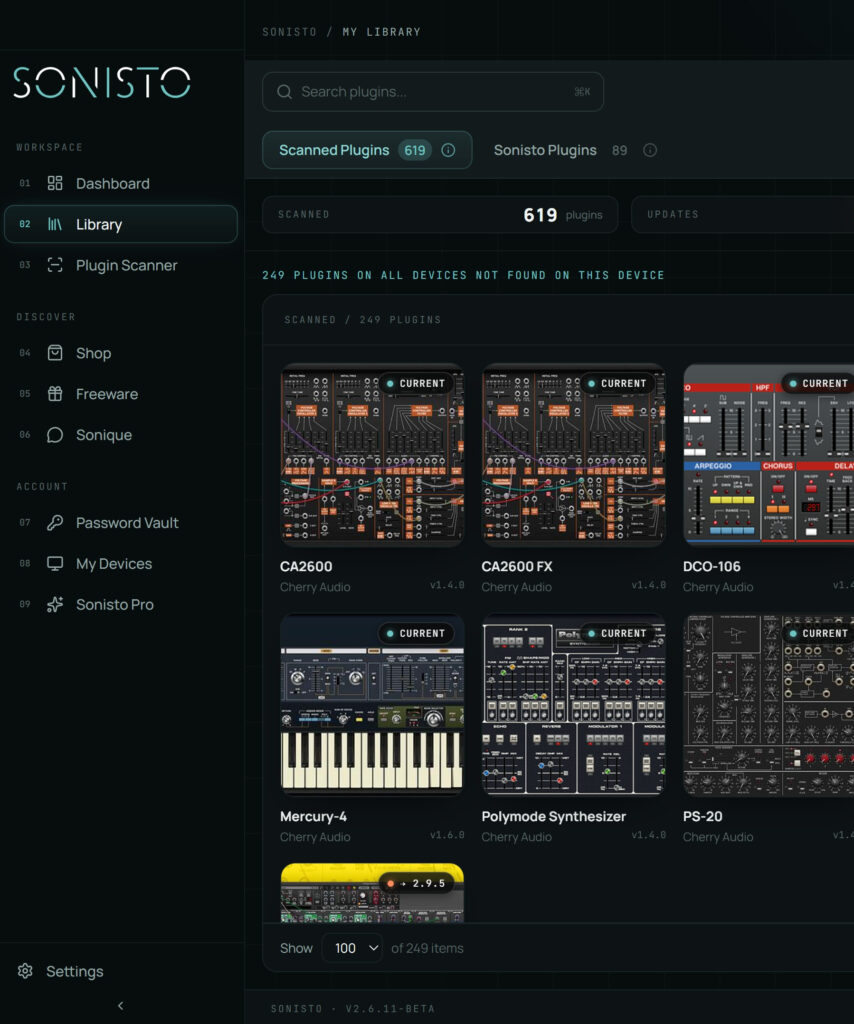
Every DAW keeps its own list of the plugins it has found, and most add to it only when they start or when you ask. When a new plugin does not show up, check that the DAW looks in the folder the plugin installed to. Then make it rescan: the Plugin Manager in FL Studio, Rescan in Ableton Live, the Plug-in Manager in Logic Pro, Reset Blocklist in Studio One and Re-scan in REAPER; in Pro Tools, check the Avid plug-ins folder. Each list covers one DAW. To see every plugin on the computer by brand, with its version, scan it with a plugin manager such as Sonisto, whose free plan covers one computer.
Updated 22 October 2026 by Sonisto, which makes the plugin manager this guide mentions. Every menu and folder below is taken from each DAW maker’s own documentation, read on 22 October 2026.
Open Options > File settings > Manage plugins to reach the Plugin Manager, and run Find installed plugins with Verify plugins switched on. Verifying is slower: it opens each plugin and files it as an effect or a generator. New plugins appear in the Browser under Plugin database > Installed, in Effects > New and Generators > New. VST3 plugins have to be in the standard VST3 folder to be found; the extra folders under Plugin search paths are meant for older VST plugins that came without an installer.
In Live 12, open Settings (Ctrl and comma on Windows, Cmd and comma on a Mac) and go to Plug-Ins. Under Plug-In Sources, check which sources are on: VST plug-ins in the system folders, a VST custom folder, and on a Mac, Audio Units. A plugin installed while Live is open appears after you press Rescan. Holding Alt (Windows) or Option (Mac) while you press Rescan deletes Live’s plug-in database and scans everything again, which takes longer.
Logic Pro loads Audio Units plug-ins. Choose Logic Pro > Settings > Plug-in Manager (Preferences on older versions of macOS). The Compatibility column shows whether each plugin passed Logic’s validation. Select a plugin marked as failed and click Reset & Rescan Selection. If a plugin is not listed, or still fails, Apple’s next step is Full Audio Unit Reset in the same window, then quit and reopen Logic Pro, which rescans every Audio Units plug-in.
On Windows open Studio One > Options, on a Mac Studio One > Preferences, then Locations > VST Plug-ins, and check that the folder your plugin installed to is in the list. A plugin you chose to Disable during the startup scan goes on Studio One’s blocklist and is not loaded again. Press Reset Blocklist in the same window, and Studio One scans every listed folder again the next time it starts.
Open Options > Preferences > Plug-ins > VST. The VST plug-in paths field lists the folders REAPER scans; add the folder your plugin installed to, then press Re-scan, Apply and OK. By default REAPER also checks these folders each time it starts.
Pro Tools 11 and later loads 64-bit AAX plug-ins, all from Avid’s Plug-Ins folder (see where every format installs, linked below). Avid’s own way to take a plugin out of Pro Tools on a Mac is to drag it into the Plug-Ins (Unused) folder beside that folder, so when a plugin has gone missing, look there first.
Each DAW lists only what it can load, under its own names, and keeps that list to itself. To see everything installed on the computer, sorted by brand with each plugin’s version and format, scan it with a plugin manager. Sonisto lists VST, AU and AAX plugins on Mac and Windows and marks the ones with an update. The Free plan covers one computer and one scan a month; Basic covers 2 computers and Pro covers 10. A scan only reads what is installed and does not change it. See the plans side by side.
Choose Logic Pro > Settings > Plug-in Manager (Preferences on older versions of macOS). It lists the Audio Units plug-ins Logic has found and whether each passed validation, and Reset & Rescan Selection checks a plugin again.
Usually the DAW has not rescanned since the install, the plugin is in a folder the DAW does not look in, or an earlier failed scan made the DAW skip it. Rescan as above for your DAW, check the folder, and check the format: Logic Pro loads Audio Units and Pro Tools loads AAX.
Each DAW manages the plugins it loads itself. A separate plugin manager can list every plugin on the computer, across formats and brands, in one place. A Sonisto scan reads what is installed and changes nothing a DAW loads.
Folder locations for every format: where every plugin format installs. Updates across brands: how to check for plugin updates. See what Sonisto does.
Scan your computer, see what you own and keep your setup under control with Sonisto.
Download the Sonisto Desktop App now and get ready to scan and organize.
Sonisto runs on Mac and Windows. Send yourself the link and download it on your computer.